

Description
Download GeoGebra Graphing Calculator – Free, Secure & Multi‑Platform Math Tool
Overview
GeoGebra Graphing Calculator is a free, cross‑platform app that brings the power of a full‑featured graphing calculator to teachers, students, and anyone who works with mathematics or science. Designed with education in mind, the app lets instructors create custom problems, share interactive worksheets, and receive instant feedback on student submissions. Its sleek, yet functional interface may appear minimal at first glance, but under the surface lies a robust engine capable of handling algebraic expressions, geometric constructions, calculus operations, and statistical analysis. Whether you are preparing a high‑school lesson on quadratic functions, exploring trigonometric identities in a university lab, or simply need a reliable tool for everyday calculations, GeoGebra offers a secure, regularly updated environment that works seamlessly on Windows, macOS, Android, and iOS. The app’s cloud‑based collaboration features make it easy to assign tasks, monitor progress, and provide quick, constructive feedback, turning a traditionally dull grading process into an interactive learning experience.
Key Features
- Dynamic Graphing Engine: Plot functions, inequalities, and parametric equations with real‑time manipulation.
- Algebraic Solver: Simplify expressions, solve equations, and factor polynomials directly within the interface.
- Geometry Toolkit: Construct shapes, calculate measurements, and explore transformations with drag‑and‑drop precision.
- Calculus Support: Compute derivatives, integrals, limits, and series expansions effortlessly.
- Statistical Analysis: Generate histograms, box plots, and regression lines for data sets.
- Teacher Dashboard: Create assignments, distribute worksheets, and receive student submissions instantly.
- Cloud Sync & Collaboration: Save projects to the GeoGebra cloud, share links, and collaborate in real time.
- Multi‑Language Interface: Available in over 30 languages, making it accessible worldwide.
- Free & Open Source: No hidden fees, ad‑free experience, and regular community‑driven updates.
- Export Options: Export graphs as PNG, SVG, or PDF, and embed them into presentations or documents.
Installation & Usage Instructions
Getting started with GeoGebra Graphing Calculator is straightforward, regardless of your operating system. Follow the steps below to download, install, and begin exploring the app’s capabilities.
Windows & macOS
- Visit the official GeoGebra website or your preferred app store (Microsoft Store for Windows, Mac App Store for macOS).
- Click the Download button; the installer file (EXE for Windows, DMG for macOS) will start downloading.
- Run the installer and follow the on‑screen prompts—accept the license agreement, choose an installation folder, and click Install.
- After installation, launch the application from the Start menu or Applications folder.
- Sign in with a free GeoGebra account to enable cloud sync and access teacher tools. If you don’t have an account, create one using your email or Google credentials.
Android & iOS
- Open Google Play Store (Android) or App Store (iOS) on your device.
- Search for “GeoGebra Graphing Calculator” and tap Install.
- Once installed, open the app and grant permission to access storage for saving files.
- Log in with your GeoGebra account to sync projects across devices.
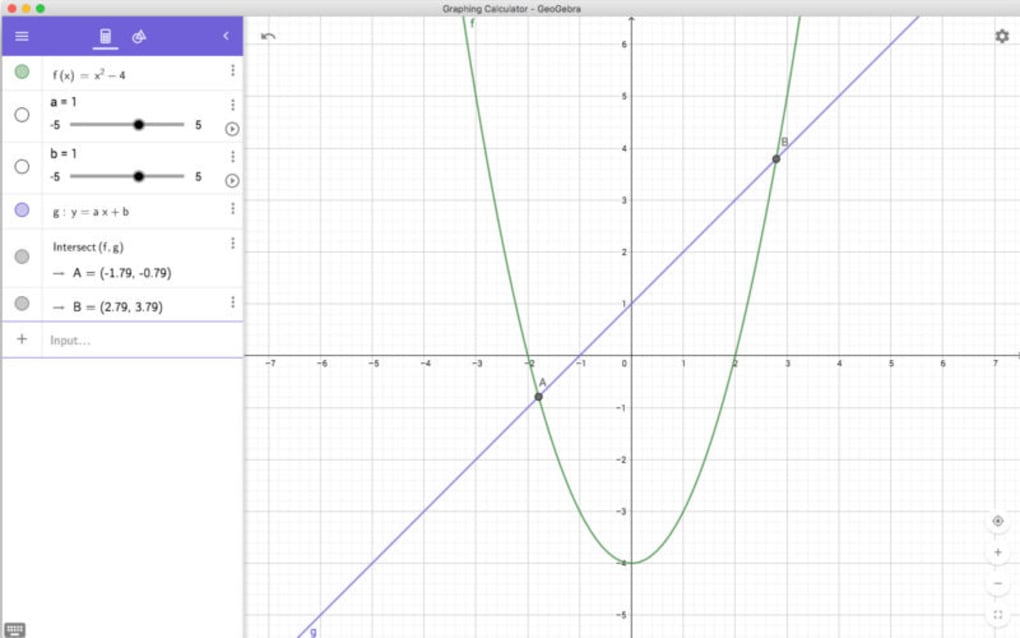
After logging in, you’ll find a clean workspace with a toolbar on the left, an input bar at the bottom, and a large graphing area in the center. To plot a function, type it directly into the input bar (e.g., y = sin(x)) and press Enter. Use the toolbar icons to add points, sliders, or geometric objects. Teachers can switch to Classroom Mode via the menu, where they can create assignments, set deadlines, and view student submissions in a dedicated dashboard. The app also supports offline work; any changes made offline will automatically sync when you reconnect to the internet.
Compatibility, Pros & Cons
GeoGebra Graphing Calculator is truly cross‑platform. It runs natively on Windows 10/11, macOS 10.13 and later, Android 5.0+, and iOS 11+. A lightweight web version is also available, ensuring that users on Chromebooks or Linux machines can access the full feature set through a browser without any installation. The app’s performance is optimized for both low‑end tablets and high‑resolution desktop monitors, making it a versatile choice for classrooms with mixed device inventories.
Pros
- Completely free with no ads or subscription traps.
- Rich set of mathematical tools that cover algebra, geometry, calculus, and statistics.
- Seamless cloud integration for instant sharing and collaboration.
- Regular updates driven by an active open‑source community.
- Multi‑device compatibility ensures consistent experience across Windows, macOS, Android, and iOS.
- Teacher‑focused dashboard simplifies assignment creation and grading.
- Export options make it easy to incorporate graphs into reports and presentations.
Cons
- The default UI is intentionally minimal, which may feel “dull” to users expecting flashy graphics.
- Advanced features (e.g., 3D graphing) are available only in separate GeoGebra apps.
- Occasional synchronization delays on slow internet connections.
- Learning curve for teachers unfamiliar with dynamic mathematics software.
Frequently Asked Questions
Is GeoGebra Graphing Calculator truly free?
Yes. The app is completely free to download and use on all supported platforms. There are no hidden fees, premium tiers, or advertisements.
Can I use GeoGebra offline?
Absolutely. All core functionalities work offline. Any changes you make will automatically sync to the cloud once you reconnect to the internet.
How does the teacher dashboard help with grading?
Teachers can assign problems, set deadlines, and view each student’s submitted graph or worksheet in a centralized view. Feedback can be added directly on the student’s work, and grades can be exported to CSV for record‑keeping.
Is my data secure when using GeoGebra’s cloud?
GeoGebra employs industry‑standard encryption for data in transit and at rest. Your projects are stored on secure servers, and you retain full control over who can view or edit each file.
Can I export my graphs for use in other applications?
Yes. GeoGebra allows export to PNG, SVG, and PDF formats, making it easy to embed high‑quality graphics into presentations, reports, or textbooks.
Final Verdict & Call to Action
GeoGebra Graphing Calculator stands out as a versatile, secure, and entirely free solution for educators and students alike. Its extensive feature set covers virtually every branch of mathematics, while the cloud‑based collaboration tools streamline classroom workflow. Although the interface leans toward simplicity—sometimes perceived as “dull”—this design choice ensures that the learning curve remains manageable and that the app runs smoothly on a wide range of devices. For teachers seeking a reliable way to assign, collect, and assess mathematical tasks, GeoGebra offers a professional-grade platform without the price tag. Students benefit from an interactive environment that encourages exploration and immediate visual feedback.
Ready to enhance your teaching toolkit or boost your own math practice? Download GeoGebra Graphing Calculator now and start creating dynamic lessons, solving complex equations, and sharing insights with peers—all for free.
Guides & Tutorials for GeoGebra Graphing Calculator
How to install GeoGebra Graphing Calculator
- Click the Preview / Download button above.
- Once redirected, accept the terms and click Install.
- Wait for the GeoGebra Graphing Calculator download to finish on your device.
How to use GeoGebra Graphing Calculator
This software is primarily used for its core features described above. Open the app after installation to explore its capabilities.
User Reviews for GeoGebra Graphing Calculator 0
No reviews found





.webp)